Airtable is an exceptional tool. It bridged the gap between basic spreadsheets and complex relational databases. For many teams, it serves as the initial landing spot when Google Sheets outgrows its usefulness. However, there comes a point in the lifecycle of every growing business operations process where Airtable begins to creek under pressure.
Whether it is a skyrocketing monthly bill, the rigid structure of interfaces, or the "Integration Tax" paid to Zapier to route notifications, operations managers are discovering that database management is different from workflow execution. Here are ten critical reasons why operations teams are looking for Airtable alternatives.
1. The "Integration Tax" (Brittle Third-Party Syncs)
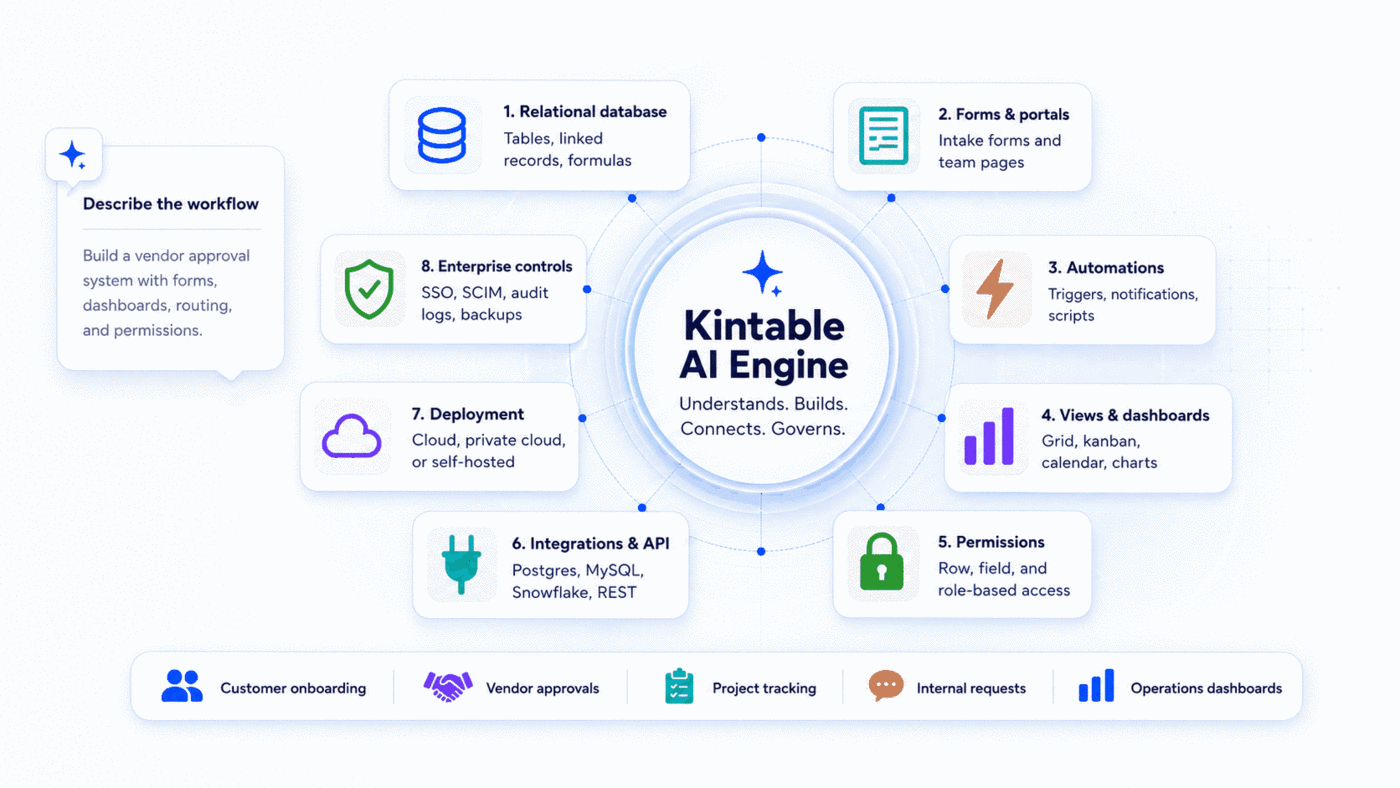
Airtable holds data beautifully, but it does not execute workflows natively. If you need to trigger multi-step notifications, route invoices to QuickBooks, or capture files via external forms, you must glue Airtable to Zapier, Typeform, and Slack. This multi-tool stack introduces integration risk: when a field name changes in Airtable, your automations break. Kintable avoids this by housing the database, forms, logic, and notifications in a single prompt-generated system.
2. Lack of Native, Secure Client Portals
If you want to give external vendors or clients access to track their onboarding progress or submit files, Airtable poses a security risk. Sharing a base view reveals too much data. Sharing interfaces requires adding clients as paid users or purchasing separate portals like Softr. Kintable generates distinct, secure client-facing portals natively, separating private operations data from public views automatically.
3. Scale and Record Volume Limits
Airtable enforces hard caps on record volume (e.g., 50,000 records per base on team tiers). When you hit the limit, Airtable freezes, forcing teams to write archivers or upgrade to expensive contracts. Because Kintable is built on a scalable PostgreSQL database backend, it handles millions of relational rows without performance lag.
4. High and Aggressive Per-Seat Pricing
Airtable charges full pricing seats for everyone who needs to edit or view data in the workspace. For operations teams working with hundreds of contract staff, field workers, or external stakeholders, licensing costs grow exponentially. Kintable offers flexible seat pricing and unlimited free client portal logins, making collaboration affordable.
5. Rigid Permission Restricting (SSO & RLS)
Security teams running audits (like SOC2) struggle with Airtable. By default, any user added to a base can view all tables. Field permissions and Row-Level Security (RLS)—ensuring employee A only sees employee A's records—are locked behind opaque, expensive enterprise contracts. Kintable includes SAML SSO and row-level access control on all team tiers.
6. No Native Support for Conditional Forms
Intake forms are the frontline of operations workflows. Airtable's default forms are static and lack advanced conditional branching (e.g., "If Category is Software, show License ID field"). Teams must integrate Typeform or Jotform, adding another tool to the queue. Kintable generates smart, validated forms directly connected to database schemas from one prompt.
7. The Engineering Bottleneck in Complex Automations
Airtable automations are helpful for simple actions (like "when status updates, email X"). But if you require looping through records, conditional multi-reviewer logic, or complex integrations, you must write custom Javascript blocks. Operations managers end up waiting on engineering queues—which defeats the purpose of no-code tools. Kintable generates this logic natively from plain-English descriptions.
8. Fractured Audit Trails for Compliance
When an internal request gets approved, your compliance auditors need proof of a secure chain of custody. In an Airtable + Zapier + Slack stack, proving who clicked "Approve" is hard because the action is fragmented across three platforms. Kintable logs every edit, approval trigger, and comment in a single, immutable audit log.
9. No Native PDF or Document Generation
Operations processes often end with a document: a purchase order receipt, a signed agreement, or a PDF invoice. Airtable cannot compile relational rows into clean, printable layouts without third-party integrations like documint or Page Designer. Kintable generates documents natively, converting database records into downloadable PDFs instantly.
10. Inability to Lock Down Data from Shared Interfaces
Even when using Airtable Interfaces to hide data, tech-savvy users can inspect network requests to extract hidden columns or read API endpoints. This makes Airtable unsuitable for sensitive operational workflows (like payroll tracking or patient coordination). Kintable enforces permissions at the API/database layer, keeping restricted cells secure.
Tired of Airtable limitations?
Describe your operational database in plain English. Kintable generates the tables, forms, automations, and portals in under 2 minutes.
Build your database freeFrequently Asked Questions
What is the best Airtable alternative for operations?
For operations teams running approvals, onboarding, and intake, Kintable is the best alternative. It replaces not just the database (Airtable) but also the integration layer (Zapier) and the frontend portal (Softr) using a single AI prompt.
Does Kintable use a PostgreSQL database?
Yes. Kintable's database engine is backed by secure, relational PostgreSQL architecture, providing superior scale, query speeds, and stability compared to flat no-code sheets.