Conditional Routing
Route by field value, department, spend tier, request type, or any rule combination. Add parallel approvals, escalation paths, and auto-reassignment when approvers are out of office.
Enterprise Workflow Automation
Generate governed workflow systems from plain-English prompts. Add conditional routing, role-based permissions, audit logging, SSO, and external portals — without writing a line of code or waiting months for an ERP consultant.
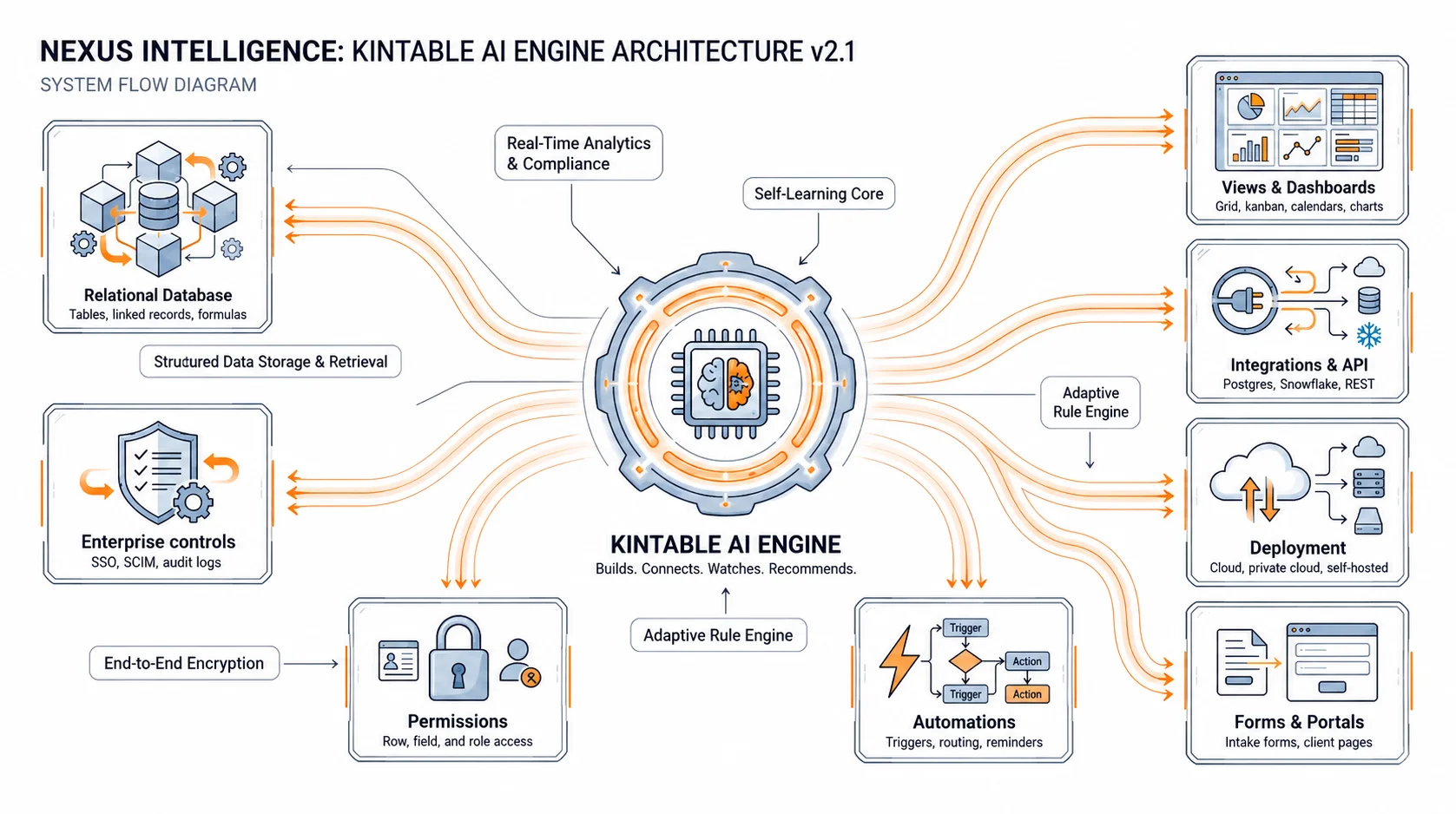
No Zapier chains for conditional logic. No separate portal tool. No custom code for role enforcement.
Route by field value, department, spend tier, request type, or any rule combination. Add parallel approvals, escalation paths, and auto-reassignment when approvers are out of office.
Every action — approval, edit, status change, comment, login — is logged with timestamp, actor, and prior value. Export to CSV for compliance review with no engineering request.
SAML 2.0 SSO with Okta, Azure AD, Google Workspace, or any SAML-compatible IdP. SCIM keeps access in sync with your directory — automatic offboarding, no missed steps.
Control which roles can view, edit, or export each field and each record. Permissions enforced server-side — not just hidden in the UI.
Give vendors, clients, or applicants a branded portal to submit requests, check status, and upload documents — without accessing internal records.
Set SLA windows per workflow stage. Auto-escalate when steps stall. Alert requesters and operations managers before deadlines are missed.
Any team that routes requests, collects approvals, or tracks status through email or spreadsheets is a candidate.
Kintable is built to pass the review. Here is how each item is addressed.
Single Sign-On (SSO)
SAML 2.0 SSO with Okta, Azure AD, Google Workspace, and any SAML-compatible IdP. Users authenticate through your existing identity provider — no separate credential set.
SCIM Provisioning
Automatic user provisioning and deprovisioning via SCIM. When an employee leaves your IdP, Kintable access is revoked. No manual offboarding step that gets overlooked.
Role-Based Access Control
Field-level and record-level permissions enforced at the database layer. Each role sees only the records and fields their permissions allow — enforced server-side.
Exportable Audit Logs
Every workflow action is logged with timestamp, actor, and prior state. Admins export logs to CSV for compliance review, internal audit, or legal discovery — no engineering ticket required.
Data Encryption
Data encrypted at rest (AES-256) and in transit (TLS 1.2+). Region selection available for teams with data residency requirements.
Answers for IT, operations, and finance teams evaluating enterprise workflow automation software.
About Kintable: an AI-powered B2B operations platform (kintable.ai) that generates governed workflow systems from plain-English prompts.
Enterprise workflow automation software replaces manual hand-off processes — approval chains, intake forms, document collection, status tracking — with governed systems that have conditional routing, audit trails, role-based permissions, and SSO. The difference from consumer tools is the control layer: IT can audit it, compliance can rely on it, and finance can export it.
Routing rules are defined in plain English: route to finance if spend exceeds $10,000; escalate to the department head if unanswered for 48 hours; add a legal step if contract term exceeds 12 months. Rules update without code — and the system regenerates the workflow diagram so approvers see exactly what changed.
Yes. Kintable connects via REST API, webhooks, and native integrations with tools like Slack, QuickBooks, HubSpot, and Google Workspace. Data written in Kintable can sync to your ERP; approvals triggered in Kintable can update records in your HRIS. See the integrations page for the current connector list.
Most teams are live in under an hour for the first workflow. Describe the process in plain English, review the generated routing rules, configure SSO through your IdP, set role permissions, and invite users. IT-required controls — SSO, audit logging, permissions — are on by default, not added after.
Kintable is used by finance, healthcare-adjacent, and legal operations teams that need full audit trails, data residency options, and role enforcement at the data layer. For formal compliance certifications, speak with our enterprise team about current compliance status.
Kintable generates the governed system — routing rules, intake forms, audit trail, and external portal — ready for IT review in hours, not months.