The learner journey crosses offices
An inquiry can become an applicant, enrolled student, advisee, program participant, alumni contact, or support case. Each step needs context from the last one.
Schools, universities, districts, and learning programs
Education work is not one workflow. It is a learner journey that moves across admissions, enrollment, advising, families, faculty, staff, programs, finance, and leadership. Kintable gives each team its own work surface while keeping the institution connected around signals, ownership, follow-up, and reporting.
Review workflow rules before launch
Limit access by role and legitimate need
Track approvals and changes
Admissions, enrollment, support, programs, staff, and governance
From inquiry to enrollment, support, program movement, and completion tracking
Describe the operating model and refine it with your team
Access for advisors, admissions, faculty, staff, and leaders
Schools and universities often have strong people working inside fragmented systems. The result is familiar: signals arrive late, ownership is unclear, and leaders cannot see the full learner journey without stitching together spreadsheets, inboxes, and exports.
An inquiry can become an applicant, enrolled student, advisee, program participant, alumni contact, or support case. Each step needs context from the last one.
Missing documents, attendance concerns, registration blockers, aid questions, capacity pressure, and family requests only matter when they reach the right team.
Education workflows need permissions, audit history, approval paths, and policy review before education records, directory information, or other sensitive student data is used.
Kintable is designed around two practical needs: the right context at the right moment, and a clear next action for the person responsible.
Bring together admissions status, enrollment tasks, advising notes, support signals, course activity, program requests, and outreach history into structured records.
Route tasks to admissions, advising, financial aid, student services, faculty, program teams, or operations leaders with clear due dates and escalation paths.
Show leaders where work is blocked, which programs need attention, where support volume is rising, and which handoffs need review.
Start with the process you want to run. Kintable turns the prompt into connected forms, records, routing, notifications, dashboards, permissions, and audit history that your team can review and refine.
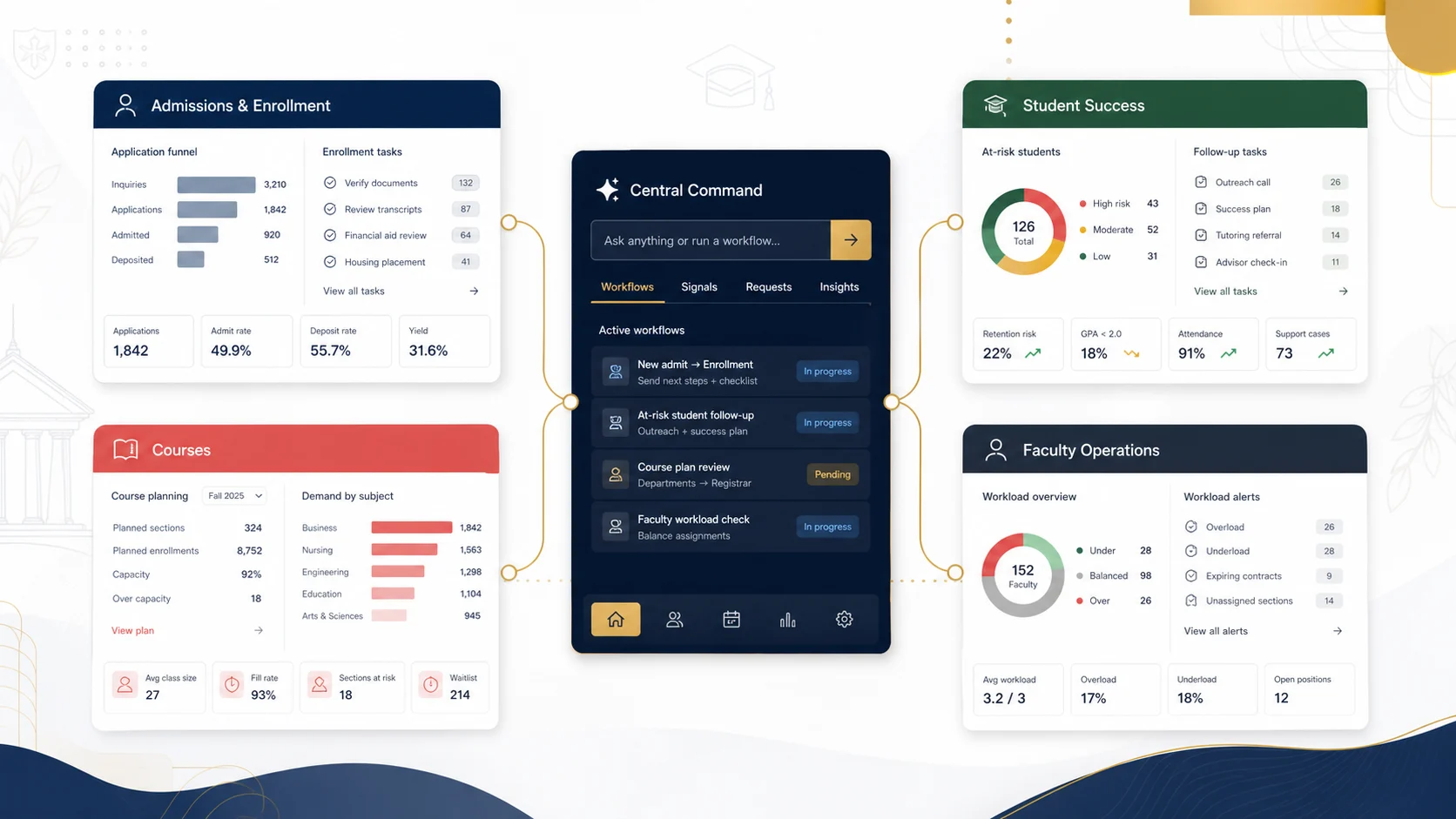
Track inquiries, applications, documents, interviews, deposit status, enrollment blockers, scholarship or aid follow-up, orientation tasks, and family or student communications.
Route academic alerts, missed advising, attendance signals, low engagement, registration blockers, aid concerns, housing issues, referrals, and follow-up tasks.
Coordinate course planning, section capacity, waitlists, cohort movement, schedule changes, program requests, curriculum tasks, rooms, and learning support workflows.
Manage workload visibility, assignments, office-hour requests, guide caseloads, onboarding, committee roles, contract tasks, approvals, and team dashboards.
Create governed intake forms, portals, status views, communications, document requests, support queues, and handoffs for students, families, guardians, and external partners.
Use permissions, structured roles, SSO, SCIM, encryption, audit history, dashboards, and review paths so education teams can coordinate sensitive workflows responsibly.
The same core system can be shaped around different institutions, age groups, programs, and support models without forcing every team into the same workflow.
Admissions inquiries, parent communications, attendance follow-up, support services, staff tasks, and safe handoffs between front office, teachers, and families.
Course requests, counseling workflows, graduation progress, intervention notes, extracurricular approvals, family outreach, and district reporting.
Admissions, enrollment management, advising, registrar coordination, student affairs, academic programs, faculty affairs, and executive visibility.
Enrollment, family communications, attendance follow-up, student support, program services, staff tasks, approvals, and system-level reporting.
Inquiry intake, cohort operations, learner engagement, guide caseloads, program milestones, parent or learner updates, and support escalation.
Applicant intake, program eligibility, credential progress, employer partner tasks, learner support, completion tracking, and operational dashboards.
Describe the domains, signals, ownership rules, follow-up expectations, permissions, and dashboards your teams need.
"Create an education operations system for admissions and enrollment, student success, learning operations, courses, faculty work, staff routing, and institutional governance. Track inquiry stages, application tasks, enrollment blockers, learner support signals, outreach, course capacity, program requests, faculty workload, staff owners, escalation rules, permissions, and dashboards."
Kintable does not replace educators, advisors, admissions teams, guides, staff, or institutional policy. It helps those people see what needs attention and coordinate the work around it.
See which applicants, families, or admitted students need review, outreach, document follow-up, aid coordination, enrollment steps, or orientation support.
Prioritize learners who need outreach, record support notes, assign follow-up, and see which cases are waiting on another office.
Review course demand, learner progress signals, guide caseloads, workload balance, assignments, program requests, and operational approvals.
Kintable is designed to support the workflow layer around education records, not to bypass institutional privacy review. Administrators decide which connectors are enabled, which fields are needed, who can access them, and how the resulting workflow is audited.
Student information, learning, admissions, finance, and support systems remain governed by institutional access and connector approval.
Only approved, minimum-necessary fields should flow into reviewed workflows with encryption, permissions, and audit history.
Role, row, and field controls help teams expose student data only to people with an appropriate operational need.
A strong education rollout should begin with one valuable workflow, a clear data boundary, and a reviewable operating model. Kintable gives technical and operational teams a practical path to evaluate the system before sensitive workflows expand.
The best first use case is usually where teams already feel the pain: admissions follow-up, enrollment blockers, advising outreach, course capacity, program requests, or staff routing.
Review one workflowDefine the records, statuses, owners, approvals, notifications, dashboards, and escalation rules before teams use the workflow with live institutional data.
Confirm administrator ownership, minimum-necessary fields, role and field permissions, SSO or SCIM needs, retention expectations, and connector boundaries.
Use audit history, dashboards, owner views, and permission review to show who changed what, which work is blocked, and where process changes are needed.
These questions connect the page back to the real buying conversation: which education teams Kintable supports, how student data should be scoped, and which decisions still belong to the institution.
Kintable can help junior schools coordinate inquiry intake, admissions tasks, parent communications, attendance follow-up, support services, staff tasks, approvals, and safe handoffs between front office teams, teachers, and families.
Kintable can help high schools coordinate course requests, counseling workflows, academic alerts, graduation progress, extracurricular approvals, family outreach, and reporting, with owners and follow-up tracked in one workflow.
Universities can use Kintable to review workflows for admissions, enrollment management, advising, registrar coordination, student affairs, academic programs, faculty operations, and leadership reporting.
Districts and education systems can shape Kintable around enrollment, attendance follow-up, family communications, program services, support queues, approvals, and system-level reporting while preserving role-based access and institution-specific review.
Connector data should only be enabled by authorized administrators, scoped to the minimum data needed for the workflow, encrypted in transit, encrypted at rest once stored in Kintable, and reviewed for data scope, access, retention, security, FERPA obligations, legitimate educational interest, and institutional policy before sensitive data is connected.
Kintable does not promise academic outcomes, make admissions decisions, replace educators, certify FERPA compliance, determine legal compliance, or remove the need for institutional privacy, security, accessibility, procurement, and policy review.
Start with admissions, enrollment, student support, learning operations, courses, faculty, staff, and governance. Kintable turns the description into a governed system your teams can review and refine.
Start with one workflow