Relational database
Linked tables, fields, relationships, and views — the data model your app actually needs, not a flat sheet.
AI App Builder
Prompt-to-app tools can generate a screen in minutes. But a real business app needs a database, workflows, approvals, permissions, and a portal behind it. Kintable is the AI app builder for operations teams: describe the work and it generates the whole governed system — not just the interface.
Building a workflow, not a whole app? See the AI workflow builder or the AI database builder.
The short answer: An AI app builder turns a plain-English description into a working application without manual coding. Most stop at the interface. Kintable builds the system behind the app — the relational database, intake forms, approval routing, automations, portals, and permissions — so what you get is a governed business operation you can run, not just a screen to maintain.
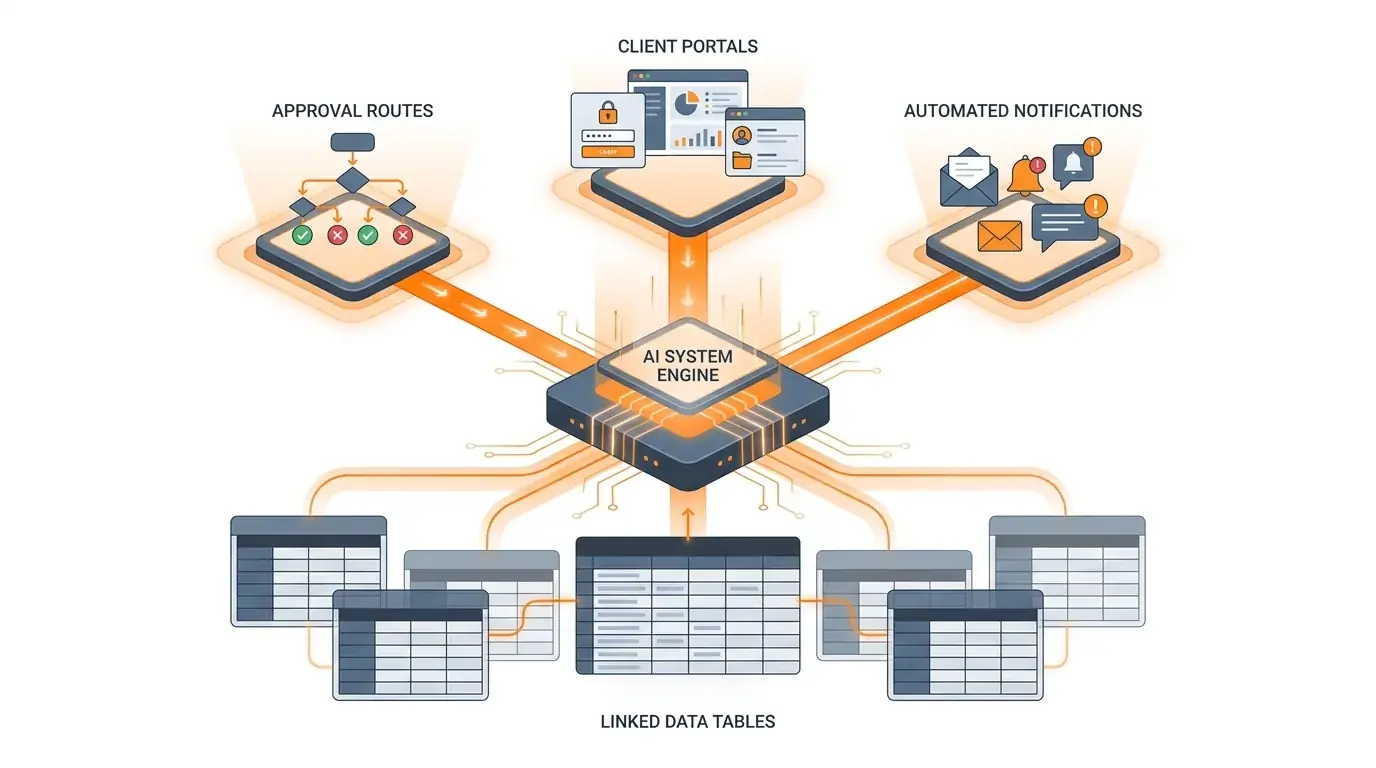
Describe a business app and Kintable generates every layer beneath it — connected, governed, and ready to run.
Linked tables, fields, relationships, and views — the data model your app actually needs, not a flat sheet.
Smart intake forms that validate and write straight into the governed system.
Conditional routing, reviewer roles, escalation, and status — the logic that runs the operation.
Branded client, vendor, or partner portals connected to the same live data, with scoped access.
Notifications, reminders, and actions across the tools you already use — connected to each record.
Permissions, SSO, SCIM, and an audit trail so the app is compliant, not just functional.
The distinction that matters once an app has to run a real operation.
| Dimension | Typical AI app builder | Kintable (AI system builder) |
|---|---|---|
| Main output | An app interface, and often the code behind it. | The full operating system: data, workflows, portals, and governance. |
| Data model | You design or connect the database. | A relational database is generated from the description. |
| Approvals & routing | Built as custom app logic. | Generated as conditional routing with an audit trail. |
| Who runs it | Often needs a developer to maintain. | Business teams run it; Kintable manages the system. |
| Governance | Depends on implementation. | Permissions, SSO, SCIM, and audit logs as part of the platform. |
Describe the operation in plain English — Kintable builds the data, workflow, and portal behind it.
"Build a business app for client requests: an intake form, a request database, priority-based approval routing, a branded client status portal, automated email updates, and an audit log of every decision."
Short, standalone answers for teams evaluating prompt-to-app tools.
About Kintable: an AI-powered B2B operations platform (kintable.ai) that builds governed workflow systems from plain-English prompts.
An AI app builder turns a plain-English description into a working application without manual coding. Most focus on the interface. Kintable focuses on the system behind the app — the relational database, intake forms, approval routing, automations, portals, and permissions — so the result is a governed business operation, not just screens.
Yes. You describe the operation in plain English and Kintable generates the data model, forms, conditional workflows, dashboards, and external portals as one connected system. You refine it with follow-up prompts, without writing or hosting application code.
An app builder produces an application — usually the interface and some logic. An AI system builder like Kintable produces the whole operating system behind the app: the relational data, workflows, approvals, integrations, portals, and governance. The app is the surface; the system is what keeps the operation running and compliant.
With Kintable, no. It is built for operations, finance, and HR teams. You describe the workflow in plain English and Kintable generates the system, so you do not need to design a database, write code, or manage hosting.
Kintable will build the system behind it: database, forms, approvals, automations, portals, and governance.