Vendor approval workflow
Employee intake, spend thresholds, manager review, finance routing, legal checks, supplier portal, and audit history.
AI Workflow Builder
Kintable turns plain-English workflow requests into governed systems: intake, records, routing, approvals, dashboards, automations, integrations, portals, permissions, and audit history your team can actually run.
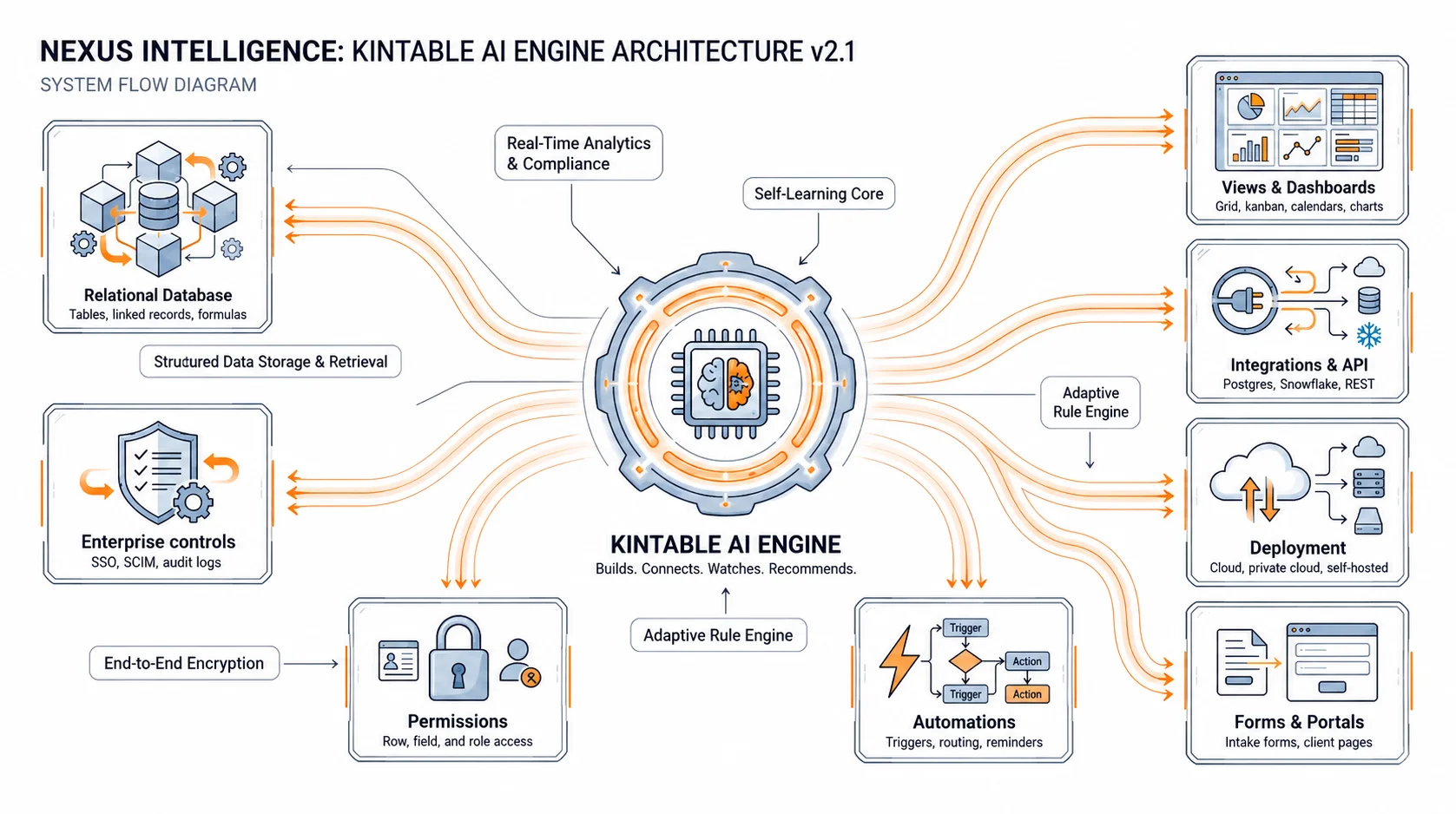
The short answer: Kintable is an AI workflow builder for business processes that need more than a trigger and an action. If the workflow has owners, statuses, approvals, forms, customers, vendors, dashboards, integrations, or audit needs, Kintable creates the system around it.
These examples combine structured records, routing logic, communication, and reporting in one place.
Employee intake, spend thresholds, manager review, finance routing, legal checks, supplier portal, and audit history.
Closed-won handoff, kickoff intake, milestone tracking, client portal, reminders, blockers, and launch dashboard.
Request forms, budget checks, conditional approvals, PO creation, vendor notification, and reporting by department.
Instagram or form leads become records, receive replies, book calls, sync to HubSpot, and trigger follow-up tasks.
Invoice intake, matching, exception routing, approval status, QuickBooks draft, payment follow-up, and finance dashboard.
Applicant intake, reviewer scoring, committee approvals, applicant portal, notifications, and decision audit trail.
Point-to-point automations are useful. They become fragile when the business also needs ownership, permissions, reporting, approvals, and history.
| Need | Kintable | Typical automation tool |
|---|---|---|
| Start from plain English | One prompt creates records, forms, routing, automations, dashboards, and portals. | You usually assemble triggers, actions, filters, and data stores manually. |
| Track the work | Each workflow run belongs to a governed record with owner, status, and history. | Runs are often logs inside an automation chain, separate from the business record. |
| Run approvals | Approval routes, permissions, comments, and audit history live with the workflow. | Approvals often require separate forms, databases, or notification tools. |
| Connect tools | Gmail, Slack, Shopify, Stripe, QuickBooks, HubSpot, databases, APIs, and more connect around the record. | Apps connect app-to-app, but the process context can scatter across tools. |
| Best fit | Business workflows with statuses, people, approvals, reporting, and governance. | Simple notifications, one-off syncs, and low-risk app-to-app automation. |
Kintable builds the workflow as a governed system so business teams can inspect, refine, and run it without waiting on engineering.
Forms, portals, or connected tool triggers that create clean records with required context.
Conditional logic for ownership, approvals, exceptions, escalations, and follow-up steps.
Linked data for people, requests, vendors, customers, files, invoices, tasks, and outcomes.
Email, Slack, SMS, invoices, reminders, CRM updates, and cross-tool actions tied to each record.
Queues, SLA risk, overdue work, blocked records, approval volume, and operational reporting.
Permissions, audit history, SSO-ready controls, external access boundaries, and reviewable workflow changes.
Good workflow prompts include the trigger, the data, the decision rules, the tools, and the people who need updates.
"Build a vendor approval workflow. Employees submit a vendor request with spend estimate and documents. Route requests under $5,000 to the manager, over $5,000 to finance and legal, create a vendor portal after approval, notify Slack at each stage, and show finance a dashboard of pending approvals."
If the business needs to know what happened, who owns it, what changed, and what comes next, the workflow needs a system.
The workflow has statuses, handoffs, approvals, forms, dashboards, customers, vendors, permissions, integrations, or audit requirements.
You only need a low-risk app-to-app sync, notification, spreadsheet update, or one-step trigger without operational ownership.
These pages help buyers understand when they need a workflow, a portal, a spreadsheet replacement, or the full AI system.
See how Kintable connects Gmail, Stripe, QuickBooks, Shopify, HubSpot, Slack, databases, and APIs.
Understand the broader category: governed data, intake, approvals, portals, automations, and integrations from one prompt.
Read the tactical guide to automating multi-step approval workflows without developers.
Short answers for teams deciding whether a workflow needs a full system behind it.
An AI workflow builder turns a plain-English business process into a working workflow system with intake, records, routing, approvals, automations, dashboards, integrations, permissions, and audit history.
Many workflow automation tools connect apps together but do not own the workflow record. Kintable creates the records, intake, approval routes, automations, dashboards, integrations, and history in one governed system.
Yes. Kintable can generate approval workflows for vendors, purchases, client onboarding, finance reviews, HR requests, applications, contracts, and other processes with conditional routing and audit history.
Use a simpler automation tool when you only need one app to trigger another app. Use Kintable when the workflow needs structured records, ownership, approvals, reporting, permissions, portals, or audit history.
Kintable creates the workflow system draft, then you refine it with AI.