Workflow records
Every run belongs to a record with owner, status, history, files, comments, and next action.
Zapier Alternative
Zapier is useful for connecting apps. Kintable is for teams whose automation needs the workflow record too: intake, owners, approvals, portals, dashboards, automations, integrations, permissions, and audit history generated from one prompt.
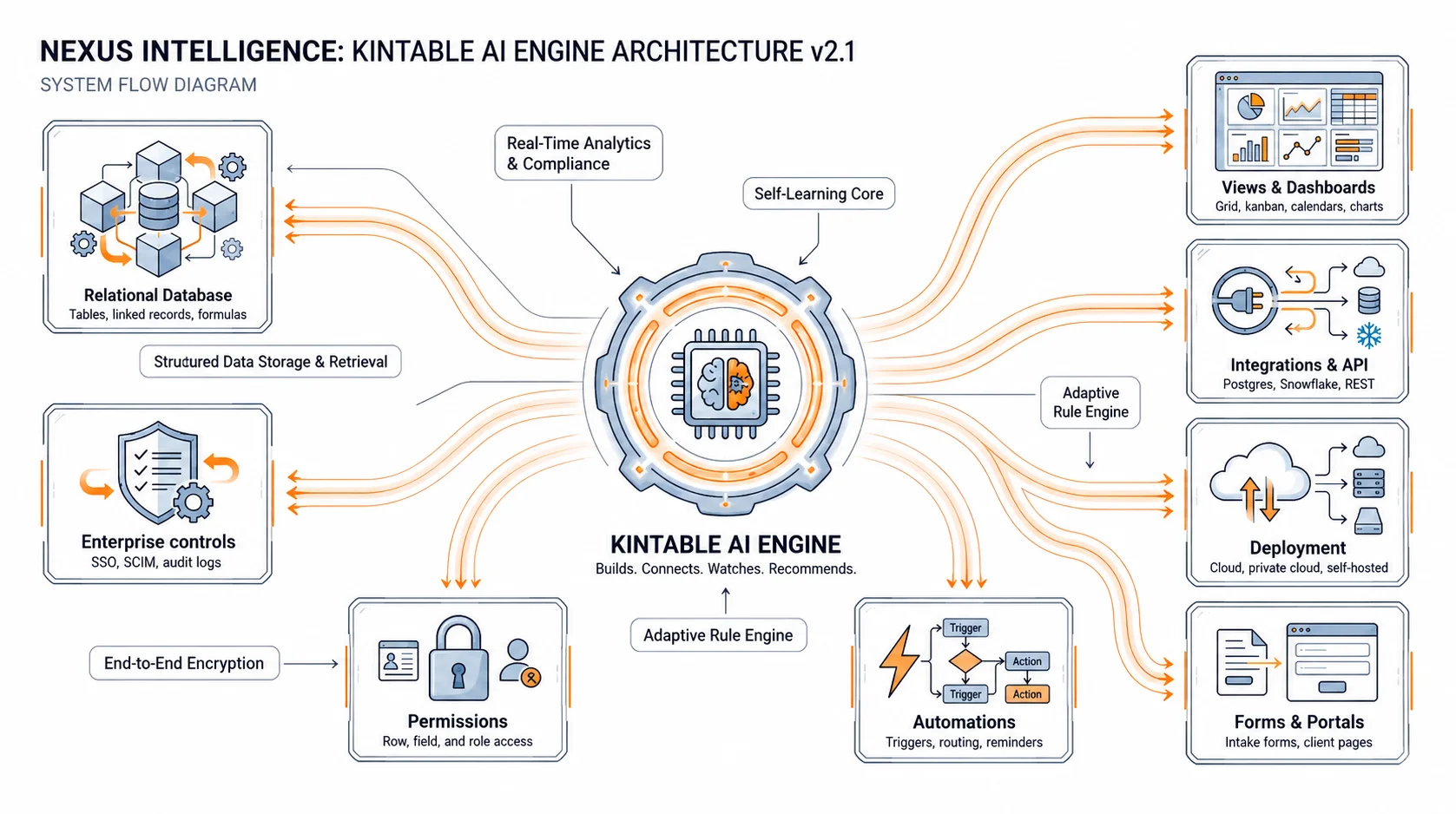
The short answer: Zapier is great when one tool should trigger another. Kintable is better when the work also needs a governed place to live: records, forms, ownership, approvals, dashboards, portals, permissions, and an audit trail around every action.
Automation can move data between apps. A workflow system tracks the record, owner, status, decisions, exceptions, and history around that automation.
| Need | Kintable | Zapier-style automation |
|---|---|---|
| Connect apps | Connects tools around the governed workflow record. | Connects apps through triggers, actions, agents, and app integrations. |
| Own the workflow record | Records, owners, statuses, files, comments, approvals, and history stay together. | Business context may live across many apps, tables, logs, and automations. |
| Run approvals | Approval routes, permission rules, notifications, and audit history are generated together. | Approvals often require extra setup across forms, tables, notifications, and storage. |
| Give external access | Client, vendor, partner, or applicant portals connect to the same workflow data. | External portals may require another tool or a separately maintained interface. |
| Best fit | Operational workflows that need data, actions, approvals, dashboards, portals, and governance. | Broad app-to-app automation, quick syncs, notifications, AI agents, and connector-heavy tasks. |
Kintable turns the process into something your team can inspect, govern, and improve instead of a chain of disconnected automations.
Every run belongs to a record with owner, status, history, files, comments, and next action.
Forms, portals, tool triggers, and API events create clean records with the context needed to route work.
Manager, finance, legal, customer, vendor, or exception approvals with conditional routing and audit history.
Gmail, Slack, Stripe, QuickBooks, Shopify, HubSpot, databases, APIs, and webhooks act around the same record.
Queues, overdue work, stuck approvals, SLA risk, volume, cycle time, and operational reporting.
Permissions, external access boundaries, audit logs, and reviewable changes for business-critical processes.
The best prompt includes the record, the decision path, the tools, and who needs visibility.
"When a Shopify order over $500 comes in, create a customer record, email the customer from Gmail, add them to Mailchimp, draft the QuickBooks invoice, alert Slack if fulfillment is late, and show operations a dashboard of open orders and stuck invoices."
The more people ask "where does this stand?" the more the workflow needs a system, not just a connector.
The workflow needs records, statuses, approvals, dashboards, portals, permissions, integrations, and audit history.
You need broad app connectivity, simple syncs, notifications, AI agents, or fast app-to-app automation without a governed workflow record.
Most teams looking for a Zapier alternative are deciding whether they need app automation or a workflow system.
See how one prompt creates intake, records, routing, approvals, dashboards, automations, and audit history.
See Kintable workflows across Gmail, Stripe, QuickBooks, Shopify, HubSpot, Slack, databases, and APIs.
Read the deeper guide to turning disconnected tools into one AI system.
Short answers for teams deciding between app automation and a workflow system.
Zapier is a strong fit for app-to-app automation across many tools. Kintable is a better fit when the automation also needs structured records, intake, approvals, portals, dashboards, permissions, and audit history in one workflow system.
Zapier connects apps and automates actions. Kintable creates the governed workflow system behind the actions: records, forms, routing, approvals, portals, dashboards, integrations, permissions, and history generated from a prompt.
Use Zapier when you need a simple app-to-app automation or a broad connector library. Use Kintable when the process needs a database, workflow ownership, approvals, reporting, portals, or audit history.
Yes. Kintable connects to tools like Gmail, Slack, Stripe, QuickBooks, Shopify, HubSpot, databases, APIs, and webhooks so the workflow can act across the stack while keeping records and history together.
Kintable creates the workflow record, approvals, automations, dashboards, and integrations together.