Airtable vs Kintable
Airtable vs Kintable: which one builds your operations system?
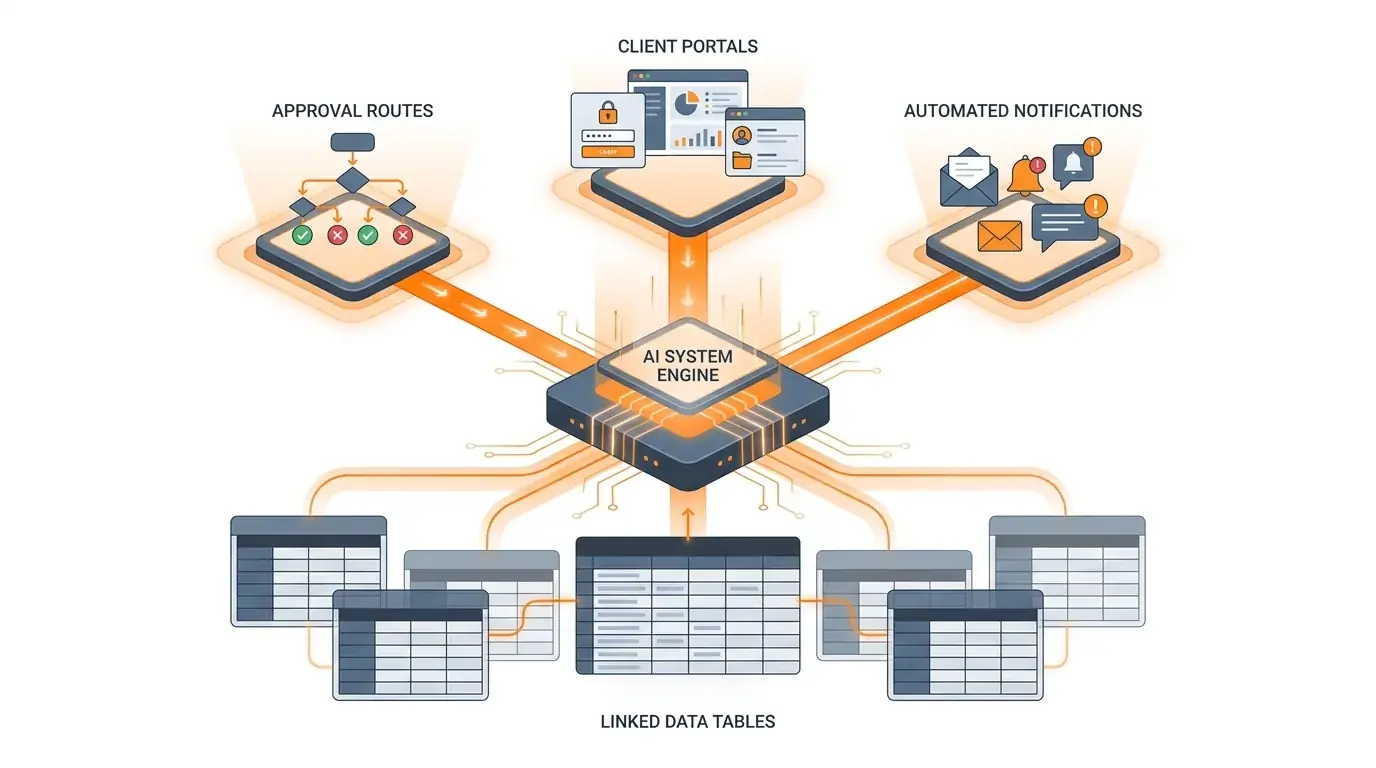
Airtable gives you a configurable database you shape into the process by hand. Kintable starts from a plain-English workflow and generates the relational database, approval routing, and external portal together as one governed system. This is a practical fit comparison — not a takedown.
Looking for the broader category view? Start with the Airtable alternative hub.
The short answer: Choose Airtable when you want a mature, flexible database and interface platform and your team is comfortable assembling views, automations, and access by hand. Choose Kintable when the job is a governed internal operation — approvals, an audit trail, and an external portal — and you want that whole system generated from a plain-English description instead of configured piece by piece.
Airtable vs Kintable, capability by capability.
Both platforms overlap on relational data, but they solve different buyer problems. Capabilities and packaging were reviewed against public Airtable documentation on July 6, 2026. Verify current details with each vendor before deciding.
| Capability | Airtable | Kintable |
|---|---|---|
| Starting point | A configurable base you structure into fields, views, and interfaces. | A plain-English workflow description that generates the connected system. |
| Relational data | Mature relational bases with linked records and spreadsheet-style views. | Generated relational records for requests, approvals, vendors, files, and owners. |
| Interfaces & views | Interface Designer plus AI-generated interface elements for building layouts. | Views and an operations UI generated around the workflow, not assembled manually. |
| Approval routing | Automations and interfaces can support approvals; teams configure the data, triggers, actions, and permissions. | Designed around explicit stages, conditional routing, status, and audit history from the start. |
| External portals | Portals available as an add-on on eligible plans, using Interface Designer for scoped external access. | Designed to generate a branded external portal connected to the internal workflow and permission model. |
| Automations & integrations | Native automations plus integrations; broad app-to-app orchestration may use external tools. | Email, Slack, invoicing, reminders, and status actions generated as part of the same system. |
| AI-assisted building | Omni and AI-generated interface elements assist within the configurable platform. | The system itself — data model, routing, and portal — is generated from the prompt. |
| Governance | Permissions and enterprise controls available; governed workflows may require deliberate design across bases, interfaces, and access. | Permissions, SSO, SCIM, and exportable audit logs positioned as part of the governed operations model. |
| Pricing model | Per-user plans; Portals and some capabilities are plan-specific or add-ons. | Free to start, then per-user paid plans. See Kintable pricing. |
| Best fit | Teams that want a flexible database and are comfortable building the process. | Operations teams that need a governed system around messy work, generated fast. |
Pick by the job in front of you.
Most teams do not need a winner in the abstract — they need the right tool for a specific operation. Here is how the choice usually breaks down.
Lean Kintable when
- arrow_rightThe process needs approval routing, status tracking, and an audit trail — not just a shared grid
- arrow_rightExternal clients or vendors need a branded portal tied to the same live data
- arrow_rightIT requires SSO, SCIM, field-level permissions, and exportable audit logs
- arrow_rightYou would rather describe the operation than assemble a base, interface, automation, and portal add-on separately
Lean Airtable when
- arrow_rightYou primarily need a flexible relational database with spreadsheet-style views
- arrow_rightYour team already knows Airtable well and the switching cost outweighs the workflow gains
- arrow_rightYou value a large template marketplace and an established community
- arrow_rightYour workflows are simple enough that configurable views and automations cover the full process
What "generate the system" actually looks like.
With Kintable, you describe the operation. The database, routing, portal, and automations are generated around it.
"Create a client onboarding system with an intake form, document collection, internal review routing, a branded client status portal, automated email updates, and an audit log of every approval."
Move the operation, not just the rows.
Hitting the wall on a hand-built Airtable base? The hardest part of switching is rarely the data — it is rebuilding the routing, permissions, and external access around it.
What Kintable aims to carry over
- arrow_rightYour core records and relationships, mapped into a generated relational model
- arrow_rightThe approval steps and routing that used to live in separate automations
- arrow_rightExternal access, as a governed portal instead of a bolt-on tool
What we will confirm with you first
- arrow_rightSupported import paths for your specific data and field types
- arrow_rightAny manual steps — Kintable does not promise one-click import or automatic relationship reconstruction until verified for your workflow
- arrow_rightValidation and rollback before you retire the Airtable base
Airtable vs Kintable: common questions.
Short, standalone answers for buyers deciding between the two.
About Kintable: an AI-powered B2B operations platform (kintable.ai) that builds governed workflow systems from plain-English prompts.
Is Kintable a good alternative to Airtable?
Kintable is a good fit when the job is a governed internal operation and you want the relational database, approval routing, and external portal generated together from a plain-English description. Airtable remains a strong choice when the priority is a mature, configurable database and interface platform your team assembles by hand. The right answer depends on required capabilities, setup effort, governance, and deployment fit.
What is the main difference between Airtable and Kintable?
The main difference is the starting point. Airtable starts from a configurable base you structure into views, interfaces, automations, and an optional Portals add-on. Kintable starts from a plain-English workflow and generates the relational model, conditional routing, and external portal as one connected, governed system.
Does Kintable cost less than Airtable?
Both use per-user pricing and Kintable is free to start. Total cost depends on seats, plan tier, and whether add-ons such as external portals are required. Because packaging and prices change, compare each vendor's current pricing page and factor in any additional automation or portal tools you would otherwise assemble around a database.
Can Kintable import data from Airtable?
Kintable is designed to help teams move an operation, not just rows. Supported import paths, relationship handling, and manual steps depend on the workflow, so confirm the current migration process with the Kintable team before switching. Kintable does not promise one-click Airtable import or automatic relationship reconstruction until that flow is verified for your data.
Still deciding between Airtable and Kintable?
Describe the operation you are trying to run. We will show you what Kintable would generate — data, forms, approvals, automations, and portals — so you can compare it against your Airtable build.
Sources reviewed July 6, 2026: Airtable's public documentation for Portals, AI-generated interface elements, and Interface Designer. Product capabilities, packaging, and pricing can change; verify current requirements with each vendor.
Airtable is a trademark of its respective owner. This page is not affiliated with, sponsored by, or endorsed by Airtable. Feature comparisons are based on publicly available documentation and are provided for informational purposes only.