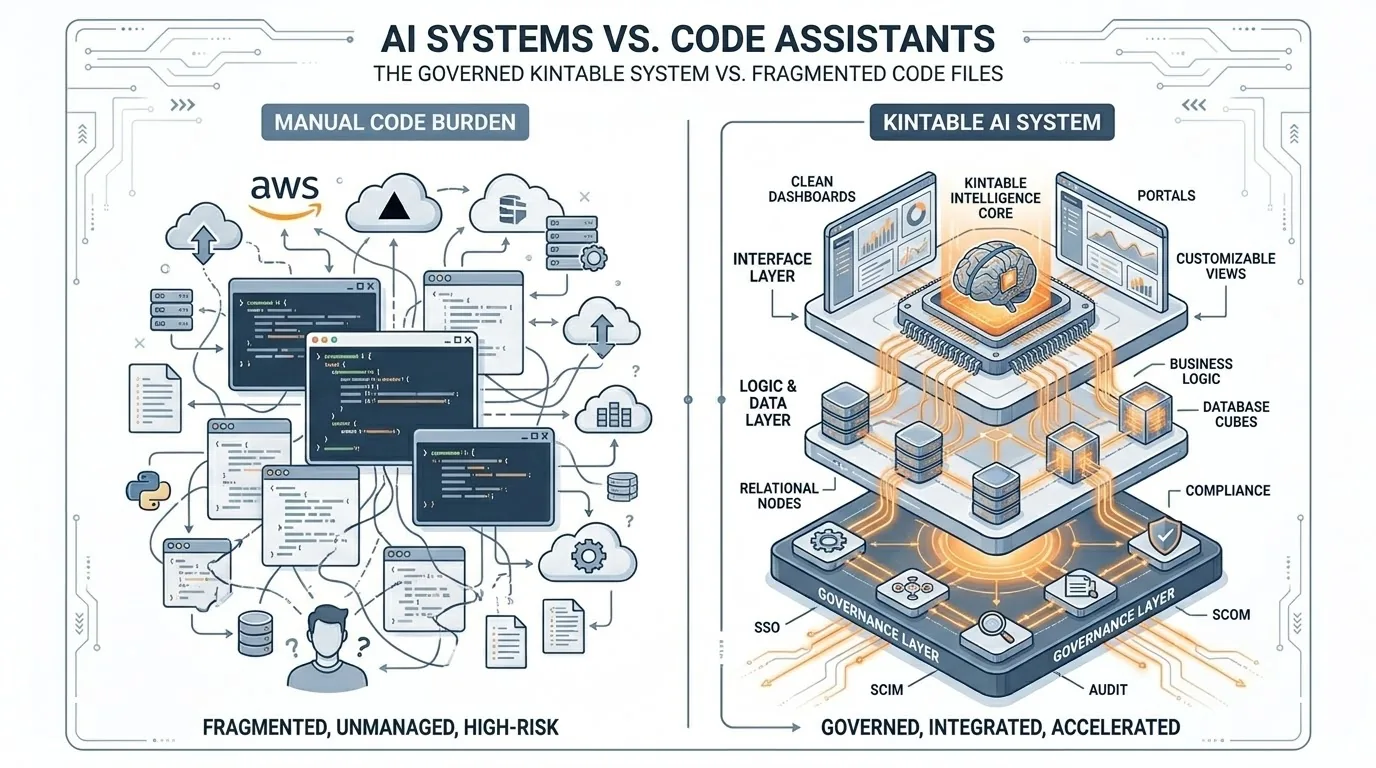
The core difference
AI app builders write raw code files that you must host, secure, and maintain. Kintable is a secure, pre-governed operational platform. It handles compliance controls like SSO, audit logs, RBAC, database administration, and API updates natively — letting your prompt structure the system without creating legacy code debt.
We are living in the golden age of AI generation. Give a prompt to a modern AI builder (like Bolt.new, AI app builders, v0, or code assistants), and in seconds you have a working frontend, a form, or a simple tracker. It feels like absolute magic.
But when you try to deploy that generated code to run business-critical operations—like vendor approvals, client intake portals, or inventory management—you hit an immediate wall. Operations software isn't just about beautiful UI screens; it represents a complex network of compliance, data persistence, user authentication, and system integrations.
This is the AI builder trap: they help you build the visible tip of the iceberg, but leave you entirely responsible for the massive compliance and infrastructure requirements hiding beneath the surface. That distinction matters for teams evaluating AI app builders, AI internal tool builders, no-code platforms, and governed AI system builders.
Kintable is designed for the operational workflows where the hidden work is the product: intake forms, approval routing, relational records, portals, permissions, audit history, integrations, dashboards, and safe AI actions. If your team is evaluating an AI system builder for production work instead of a prototype, the real question is not "can AI generate a screen?" It is "can the system keep running when finance, legal, IT, customers, and auditors all depend on it?"
The Operations Software Iceberg
What happens after you prompt? AI code builders leave the hardest parts in your lap, while Kintable packages everything in one governed environment.
Generates Raw Code Only
You receive a code bundle (React, Next.js, Node). The rest is your problem:
- ✕ Brittle Host Infrastructure: You configure servers, SSL, AWS/Vercel pipelines, and database instances.
- ✕ Manual Security Controls: No SAML SSO, row-level security (RLS), or user directory (SCIM) out of the box.
- ✕ Fragile API Pipelines: Integrations rely on custom-written scripts. When the API changes, the app breaks.
- ✕ Data Governance Gaps: Prompting sends data into public models unless you custom-build model-neutral guardrails.
The Governed System Shell
Your prompt structures Kintable's pre-built, hardened engine. No code debt:
- ✓ Serverless Scale: Instant cloud deployment with zero server setup or database management.
- ✓ Governance controls: Built-in audit trails, SAML SSO, and field-level permissions.
- ✓ Managed Integrations: Connects to 116+ SaaS tools natively. Maintenance and API updates are fully managed.
- ✓ LLM-Neutral Guardrails: Bring Your Own LLM (BYO-LLM) key. Prompts stay private under corporate compliance.
1. The Infrastructure Burden: Hosting & Maintenance
When you build an app with an AI code assistant, it writes the application files. But who hosts them? Who sets up the SQL databases database? Who schedules daily backups? Who scales the instance when your team grows from 5 to 500 users?
With raw code generators, you inherit ongoing infrastructure and deployment work. If you change a database relation, you have to run migrations. If the database crashes, you have to restore it.
The Kintable Way: Kintable is a fully hosted, managed environment. When you prompt Kintable to build a vendor intake system, it doesn't write custom server scripts. It structures a relational database on our optimized, enterprise-grade cloud. Backups, scaling, schema migrations, and high availability are handled natively under the hood. You get the agility of custom software with the convenience of SaaS.
2. The Compliance Gaps: SSO, SCIM, and Audit Trails
Operations workflows handle sensitive financial data, customer details, and proprietary business processes. Because of this, IT compliance is non-negotiable. If you try to deploy a generated app to your team, IT will ask:
- Does it support SAML 2.0 Single Sign-On (SSO)?
- Can we provision users via SCIM (identity providers)?
- Is there a durable audit log tracking every data update or approval?
- Does it support granular row-level and field-level permissions?
An AI builder outputs raw React or HTML. It does not configure your Active Directory. It doesn't write audit-trail database records unless you spend days prompting, auditing, and debugging the security layer yourself.
The Kintable Way: Every application inside Kintable inherits enterprise governance. Out-of-the-box, Kintable supports SAML SSO, SCIM directory synchronization, field-level access control, and comprehensive audit logs. You don't have to rebuild the compliance layer for every workflow; your system starts with the security and data-governance controls IT expects. For deeper review, see Kintable's security and data protection page.
Where AI app builders still make sense
AI app builders are useful when a developer wants to prototype a marketing page, a demo screen, a one-off internal utility, or custom application code that engineering will own. They shine when the output is meant to become a software project.
Kintable is different because the output is meant to become a business system. The buyer is often operations, finance, HR, procurement, customer success, or an agency team that needs a workflow live quickly without owning a new codebase. Instead of producing a pile of files, Kintable produces a governed workspace with records, forms, routing, portals, automation, integrations, and reporting already connected.
That difference is important for searchers asking "AI app builder for operations," "AI workflow builder with SSO," "AI internal tool builder with audit logs," or "no-code app builder for approval workflows." The right answer depends on whether the team wants generated code or a managed operational system. Kintable is built for the second category.
3. AI Infrastructure and LLM Neutrality
Many AI builders lock you into their choice of model, routing your prompts and business data through external servers that may train on your data. This is an immediate deal-breaker for legal teams.
Furthermore, LLM technologies change rapidly. A code assistant tied to one model or implementation can make model changes difficult, especially when orchestration logic is embedded in generated application code.
The Kintable Way: Kintable is model-neutral. We support Bring Your Own LLM (BYO-LLM) capabilities. Connect Kintable directly to your enterprise's private API keys (via approved model vendors). That setup is intended to keep model usage aligned with enterprise policy, and it lets teams change models without rebuilding the application frontend or database schemas.
Feature Guide Matrix
| Feature | Typical AI App Builders | Kintable Governed Shell |
|---|---|---|
| Output Type | Raw code files (brittle, requires compiling & hosting) | Instant operational system structured in Kintable's cloud |
| Security & SSO | Must be manually coded, integrated, and audited | Built-in SAML SSO, SCIM, and row-level permissions |
| Database Setup | Requires hosting Postgres/SQL databases, running schema migrations | Managed, relational database with automated schema updates |
| API Integrations | Custom scripts that break when external APIs update | 116+ native connectors managed and maintained by Kintable |
| Audit Logs | None, unless custom-engineered and saved to DB | Immutable ledger recording all changes for SOC 2 audits |
| Best Fit | Developer-owned prototypes, custom codebases, and throwaway demos | Operations workflows, approval systems, portals, and governed internal tools |
4. Managed Integrations and Brittle Custom Scripts
Operations workflows do not exist in a vacuum; they must talk to your other business tools. A vendor onboarding system needs to check accounting tools, send updates to chat tools, and verify payment states in payment tools.
With typical AI builders, the assistant writes custom integration scripts using API endpoints. At first, it works. But APIs are moving targets. payment tools deprecates a webhook header; accounting tools updates its auth sequence. Suddenly, your operations workflow stalls, and you have to search through hundreds of lines of generated code to fix a broken integration.
The Kintable Way: Kintable has native, managed integrations with over 116 SaaS platforms. We handle the authentication, endpoints, rate-limiting, and API updates. When an external service updates its API, Kintable updates its connector. Your workflows continue running smoothly without requiring a developer to hotfix code. This is why Kintable works as a practical AI internal tool builder for teams that want governed systems, not another fragile automation stack.
Decision rule: prototype code or production workflow?
Use an AI code builder when engineering wants fast scaffolding and is comfortable owning deployment, observability, security review, migrations, and long-term maintenance. Use Kintable when the business needs a repeatable workflow system with approval history, role-based access, connected business tools, and clear operational ownership.
The fastest way to decide is to ask who will be responsible six months from now. If the answer is "engineering," generated code may be fine. If the answer is "operations, finance, customer success, or the business team," a managed enterprise workflow platform is usually the safer path.
Build Secure Operations Systems Instantly
Describe your workflow in simple English. Kintable sets up the database, client portal, approval routing, and security. No code debt, no deployment pipelines, no IT compliance headaches.
Summary checklist
- Zero DevOps Overhead: Kintable hosts the database, configures endpoints, and manages migrations automatically.
- IT-Approved Governance: Every system inherits SAML SSO, user provisioning (SCIM), audit history, and field permissions.
- Model Agnostic: Bring Your Own LLM keys for approved enterprise model providers to support corporate data compliance.
- Unbreakable Connections: Integrations are managed natively by Kintable, protecting you from brittle API updates.
- Better buyer fit: AI app builders are strongest for developer-owned code. Kintable is stronger for governed workflows owned by business teams.
Frequently Asked Questions
Why shouldn't I just build my app using code assistants or AI app builders?
AI app builders are excellent tools for building bespoke frontends or custom logic. However, they generate raw code. For business operations, this means you are responsible for deploying servers, scaling databases, setting up SAML SSO, auditing user activities, and maintaining API connections when external tools update. Kintable acts as a hosted shell that handles these enterprise compliance and infrastructure steps natively.
How does Kintable protect our prompt data privacy?
Kintable allows you to connect your own private enterprise LLM endpoints (via BYO-LLM). Prompts and database schemas structured by Kintable can run through your contracted accounts and endpoints, which helps keep operational data within your chosen enterprise controls.
What integrations are available natively in Kintable?
Kintable supports native connections to 116+ popular enterprise systems, including CRM platforms, accounting tools, payment tools, CRM tools, issue trackers, chat tools, and email tools. Since these connections are managed on Kintable's platform level, we handle connector maintenance so you are less exposed to breakage from external schema changes.
Is Kintable an AI app builder or an AI system builder?
Kintable is often described as an AI system builder. AI app builders usually generate code for a specific application. Kintable generates and runs the governed operating system around the workflow: records, forms, approval routing, dashboards, portals, integrations, permissions, audit history, and AI guidance.