The short answer
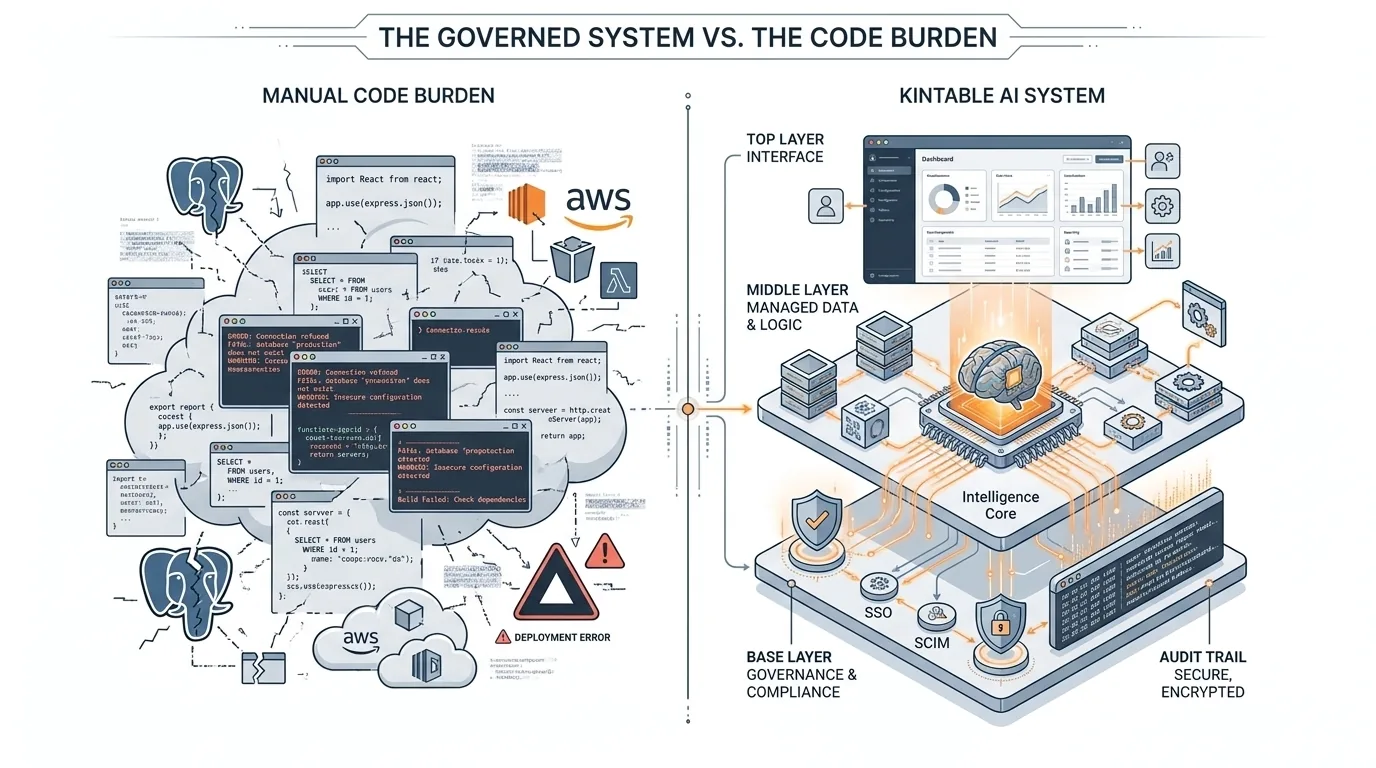
code assistants generate code files, but leave hosting, databases, compliance controls, and API maintenance to you. Kintable solves this by wrapping your workflow in a managed, governed workspace with records, forms, approvals, portals, integrations, permissions, and audit history.
When organizations need custom operational workflows such as vendor onboarding, client portals, purchase approvals, HR onboarding, or finance exception reviews, they often start by asking whether an AI coding assistant can build the app.
AI coding environments are powerful for engineering teams. They can write screens, routes, API handlers, SQL migrations, and tests. But operations teams usually do not need a new codebase. They need a working system of record with intake, routing, approvals, ownership, permissions, dashboards, and audit history.
That is the core difference between an AI code assistant and an AI system builder. One helps developers create software. The other helps business teams run work safely.
1. The Challenges of Building Directly with AI Assistants
While code assistants are excellent for writing code blocks, they are not designed to deliver production-grade, compliant business systems out of the box.
Lack of Governance & Compliance
The assistant doesn't enforce security rules: code assistants or code assistants can write React/Node code, but they do not automatically configure SAML 2.0 Single Sign-On (SSO), SCIM user provisioning, or row-level permissions. Furthermore, operations workflows (especially in finance and HR) usually need a durable audit log of who approved what. Code assistants do not build or maintain that governance layer unless you design and implement it explicitly.
Infrastructure & Deployment Overhead
With raw developer assistants, you get code, but you still have to set up AWS/Vercel hosting, configure SQL databases databases, manage SSL certificates, and set up deployment pipelines. If you use an AI assistant to write scripts connecting CRM platforms, chat tools, and payment tools, those APIs will eventually change, leaving you responsible for debugging and rewriting the integration code when it breaks.
Business Logic Gets Trapped in Code
Operational rules change constantly: approval thresholds move, procurement adds a new vendor review step, customer success changes onboarding milestones, finance updates expense categories, and legal adds an exception path. In a code-first workflow, every change becomes a development task.
That creates a slow handoff between the people who understand the process and the people who can safely change the software. A governed AI system keeps the workflow model visible: tables, fields, routing rules, permissions, and dashboards can be reviewed by the business and governed by IT without turning every process edit into a software release.
AI code assistant and AI system builder: the practical difference
| Question | AI code assistant | Kintable AI system |
|---|---|---|
| What is created? | Code files, components, handlers, migrations, and scripts. | A governed workflow system with records, forms, approvals, dashboards, portals, automations, and integrations. |
| Who owns it after launch? | Engineering or a technical founder. | Operations, finance, HR, procurement, customer success, or another business team with IT governance. |
| How is governance handled? | Manually designed, coded, tested, and audited. | Built into the platform: SSO, SCIM, role-based access, field permissions, and audit logs. |
| What happens when APIs change? | A developer needs to update and redeploy the integration code. | Managed connectors reduce brittle custom scripts across common business tools. |
| Best fit | Developer-owned apps, custom product work, and prototypes that should become codebases. | Repeatable operational workflows that need speed, control, reporting, and accountability. |
2. How Kintable Solves These Issues
Kintable is not a code assistant; it is a governed AI system platform. It acts as the structural, relational, and compliance layer, allowing teams to describe the workflow in plain English and receive a working operating system around that process.
Instead of asking an LLM to generate a custom app from scratch, Kintable uses AI to configure the business system: the relational data model, request forms, approval routing, views, dashboards, portal access, notifications, and integration points. That is why Kintable fits teams looking for AI internal tool builder capabilities without inheriting custom code debt.
Bring Your Own LLM (BYO-LLM) & LLM Neutrality
Kintable works with your organization's choice of AI models (code assistants, approved AI model vendors). If your company standardizes on code assistants (approved model vendors) for privacy or approved model vendors for speed, Kintable connects directly to those models via API or private endpoint. That lets you keep model choice aligned with your internal policy and vendor review process.
Instant Compliance Out-of-the-Box
When Kintable generates a system, it wraps the workflow in an IT-approved governance layer: SSO and SCIM readiness, row-level and field-level permissions, and automated audit trails. Every field change, approval click, and API invocation can be logged for security review. For security and procurement teams, this means Kintable starts from the controls they expect instead of asking the business to retrofit them later. See the Kintable security overview for the broader governance model.
Where each tool belongs
The strongest teams will use both categories. Developers should keep using code assistants to write tests, improve product code, scaffold internal services, and speed up engineering work. Business teams should use governed AI systems when the goal is to launch and run operational workflows without opening a permanent engineering project.
For example, if a product team needs a custom SaaS feature, a code assistant is the right tool. If finance needs an expense approval workflow with spend limits, manager routing, accounting tools sync, and audit history, an approval workflow system is often the more practical fit. If an agency needs a customer-facing workspace with files, status, comments, and permissions, an AI client portal builder is often a more practical starting point than raw generated code.
What AI systems add that code assistants do not
For operations work, the valuable output is not only the interface. It is the connected system behind the interface. Kintable focuses on the pieces business teams need after the first screen works:
- Relational records: requests, vendors, customers, projects, approvals, files, comments, and activity history connected together.
- Workflow routing: ownership, approval chains, notifications, escalations, and exception paths.
- Governed access: internal roles, external portal users, row-level visibility, field permissions, and SSO policies.
- Operational reporting: dashboards for cycle time, stuck approvals, SLA risk, volume, exceptions, and team workload.
- Managed integrations: connected SaaS tools, databases, APIs, and webhooks that are maintained as platform capabilities rather than one-off scripts.
Bottom line for operations teams
If your goal is to own a codebase, use an AI code assistant. If your goal is to run a governed business process, use an AI system builder. Kintable is built for the second job: turning plain-English workflow descriptions into production-ready systems for teams that need speed, compliance, and accountability.
Build this system faster
Key takeaways
- AI assistants generate code but leave you with the burden of server management, hosting, and database schema updates.
- Compliance controls (SAML SSO, SCIM, and audit logs) are native to Kintable but must be custom-developed with code assistants.
- Kintable is LLM-neutral, enabling you to bring your own enterprise-grade private LLM models.
- Integrations and APIs are managed automatically by Kintable, preventing brittle code breakage.
- Code assistants are a strong fit for engineering-owned software; Kintable is a strong fit for business-owned operational systems.
Frequently asked questions
How does Kintable work alongside code assistants?
No. Those tools help developers write and modify code. Kintable is for teams that want to create governed workflow systems without owning a new codebase. Many companies will use both: code assistants for engineering work and Kintable for operations systems.
Can AI code assistants build the same thing if we prompt them enough?
A technical team can eventually build many of the same pieces, but they must design the database, deployment, permissions, audit history, integrations, observability, backups, and security review. Kintable packages those requirements into the platform so the business workflow can launch faster.
What kinds of workflows are better as AI systems?
Approval workflows, procurement requests, vendor onboarding, HR onboarding, finance reviews, client portals, customer onboarding, legal intake, and operations dashboards are strong fits because they need structured records, routing, permissions, reporting, and audit history.