The short answer
spreadsheet-based tools works well for flexible databases, but operations teams that need approval routing, client portals, audit trails, and integrated automations typically need a more purpose-built system — not another tool to wire together manually.
Spreadsheet-style systems are useful starting points for structured operational data. As workflows mature, teams often need stronger routing, permissions, audit history, and external access than a manually assembled workspace can provide.
Whether it is a skyrocketing monthly bill, the rigid structure of interfaces, or the "Integration Tax" paid to automation tools to route notifications, operations managers are discovering that database management is different from workflow execution. For a landing-page summary of the category, see the AI system builder guide. Here are ten critical reasons why operations teams are looking for workflow platform options.
1. The "Integration Tax" (Brittle Third-Party Syncs)
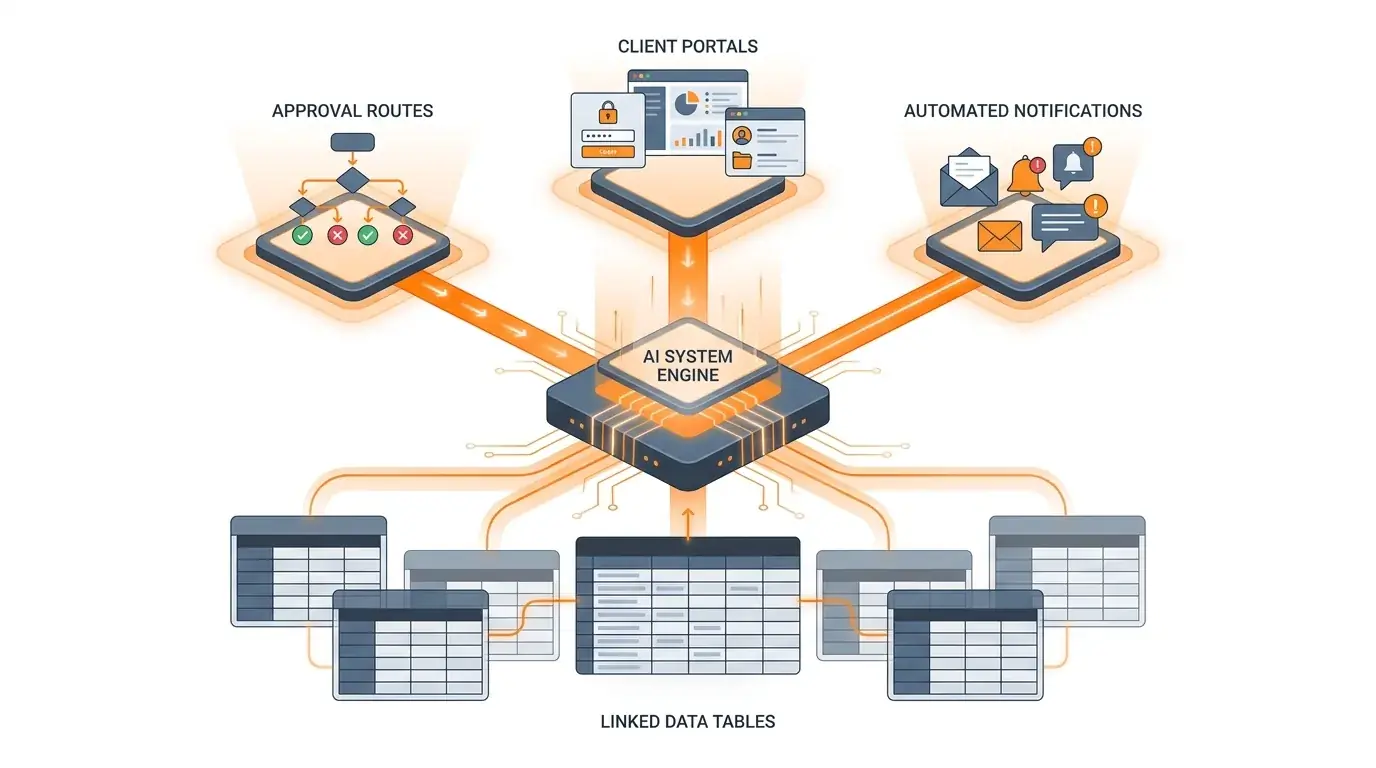
Spreadsheet-style systems can hold operational data, but multi-step approvals, notifications, external forms, and status updates often become a stack of connected tools. That assembled approach can introduce integration risk when fields, owners, or process rules change. Kintable keeps the database, forms, logic, and notifications in one prompt-generated system.
2. Lack of Native, Secure Client Portals
If you want to give external vendors or clients access to track their onboarding progress or submit files, spreadsheet-based tools poses a security risk. Sharing a base view reveals too much data. Sharing interfaces requires adding clients as paid users or purchasing separate portals like portal tools. Kintable generates distinct, secure client-facing portals natively, separating private operations data from public views automatically.
3. Scale and Record Volume Limits
spreadsheet-based tools enforces hard caps on record volume (e.g., 50,000 records per base on team tiers). When you hit the limit, spreadsheet-based tools freezes, forcing teams to write archivers or upgrade to expensive contracts. Because Kintable is built on a scalable SQL databases database backend, it handles millions of relational rows without performance lag.
4. High and Aggressive Per-Seat Pricing
spreadsheet-based tools charges full pricing seats for everyone who needs to edit or view data in the workspace. For operations teams working with hundreds of contract staff, field workers, or external stakeholders, licensing costs grow exponentially. Kintable offers flexible seat pricing and unlimited free client portal logins, making collaboration affordable.
5. Rigid Permission Restricting (SSO & RLS)
Security teams running audits struggle with spreadsheet-based tools. By default, any user added to a base can view all tables. Field permissions and Row-Level Security (RLS)—ensuring employee A only sees employee A's records—are locked behind opaque, expensive enterprise contracts. Kintable includes SAML SSO and row-level access control on all team tiers.
6. No Native Support for Conditional Forms
Intake forms are the frontline of operations workflows. spreadsheet-based tools's default forms are static and lack advanced conditional branching (e.g., "If Category is Software, show License ID field"). Teams must integrate form tools or form tools, adding another tool to the queue. Kintable generates smart, validated forms directly connected to database schemas from one prompt.
7. The Engineering Bottleneck in Complex Automations
spreadsheet-based tools automations are helpful for simple actions (like "when status updates, email X"). But if you require looping through records, conditional multi-reviewer logic, or complex integrations, you may need custom Javascript blocks. Operations managers can end up waiting on engineering queues—which reduces the benefit of no-code tools. Kintable generates this logic natively from plain-English descriptions.
8. Fractured Audit Trails for Compliance
When an internal request gets approved, your compliance auditors need proof of a secure chain of custody. In an spreadsheet-based tools + automation tools + chat tools stack, proving who clicked "Approve" can be harder because the action is fragmented across multiple platforms. Kintable can capture the relevant edits, approval triggers, and comments in a single audit trail.
9. No Native PDF or Document Generation
Operations processes often end with a document: a purchase order receipt, a signed agreement, or a PDF invoice. spreadsheet-based tools cannot compile relational rows into clean, printable layouts without third-party integrations like documint or Page Designer. Kintable generates documents natively, converting database records into downloadable PDFs without needing a separate document tool.
10. Inability to Lock Down Data from Shared Interfaces
Even when using spreadsheet-based tools Interfaces to hide data, tech-savvy users can inspect network requests to extract hidden columns or read API endpoints. This makes spreadsheet-based tools unsuitable for sensitive operational workflows (like payroll tracking or patient coordination). Kintable enforces permissions at the API/database layer, keeping restricted cells secure.
Build this system faster
Key takeaways
- Spreadsheet-style systems often require additional configuration and connected services to support multi-step approval chains and external client portals.
- Operations teams that have outgrown spreadsheet-based tools often need conditional approval routing, a compliance audit trail, and branded external portals — capabilities that may be better handled by a workflow system designed for governed operations.
- spreadsheet-based tools enforces hard record-volume caps (50,000 per base on team tiers) and full per-seat pricing for all editors and viewers, which scales poorly for large operations teams and external stakeholders.
- Row-level security and SAML SSO — standard requirements for enterprise operations — are locked behind spreadsheet-based tools's most expensive enterprise contracts, while Kintable includes them on all team plans.
- Kintable generates the entire governed workflow system (database, forms, approval logic, audit log, and client portal) from a single plain-English prompt, eliminating the engineering bottleneck that plagues complex spreadsheet-based tools automations.
Frequently asked questions
Why do operations teams look for workflow platform options?
Operations teams seek platform options for a mix of reasons: some need native client portals, some need more granular permissions or governance controls, some want a different pricing model, and some need fewer moving parts in their workflow stack. Connecting spreadsheet-based tools to external tools via automation tools can also add integration complexity and ongoing costs.
How does Kintable differ from spreadsheet-based tools for workflow management?
Kintable is designed to generate the complete system — relational database, conditional forms, notifications, and client portals — from one plain-English prompt. It also includes enterprise governance features such as SAML SSO, SCIM, and row-level security on qualifying plans.
Which AI-powered workflow platform fits operations teams that need approval workflows?
For operations teams running approvals, vendor onboarding, and intake processes, a purpose-built workflow system is often a better fit than spreadsheet-based tools. Kintable is designed specifically for governed operational workflows — intake, routing, approvals, audit trail, and external portals are built in by default, rather than assembled from separate tools.
Does Kintable use a relational database instead of spreadsheet-based tools's flat-base model?
Yes. Kintable's database engine is backed by a relational SQL databases architecture designed for governed operational workloads. Evaluated with spreadsheet-based tools's flat no-code sheet model, it is intended to support larger relational datasets and more complex workflows, but actual performance depends on the schema, query patterns, and workload size.