
Enterprise operating system for education
Connect admissions, enrollment, student success, advising, programs, courses, faculty operations, financial aid, services, and institutional reporting.
Explore education operations →Kintable generates the relational database, conditional approval logic, and secure client or vendor portal together as one governed system. Your team reviews the blueprint, refines the rules, and launches without assembling separate workflow layers.
Start with one consequential workflow. Leave with a blueprint and clear success criteria.
Already running a manual workflow? Plan your migrationQuick answer: Kintable is a unified enterprise operations platform for building governed operating systems. Describe a process in plain English and generate its connected data model, approval workflow, role-specific interfaces, external portal, permissions, and audit history together.
Every table, approval, form, dashboard, portal, permission, and audit event works from the same governed operational model.
Tables, links, views, rules, and external access assembled separately.
One prompt creates the connected blueprint for review.
Edit the example prompt or use it as written.
Create a vendor approval system with spend limits, finance routing, and a secure portal for suppliers.
Pick an example, or tap the mic and describe your own workflow.
The underlying platform remains adaptable. Our product work is concentrated on reusable education and ecommerce operations systems.
Connect admissions, enrollment, student success, advising, programs, courses, faculty operations, financial aid, services, and institutional reporting.
Explore education operations →Bring orders, customers, products, inventory, fulfillment, refunds, support, and payouts into one operating model with freshness and evidence visible.
Explore the ecommerce system →The hidden cost appears when teams must architect the data, assemble the process logic, add external access, and govern every connection themselves.
Someone must design the schema, relationships, views, permissions, forms, and reports before the team can run the process reliably.
Portals, conditional logic, notifications, and reporting often become separate layers with separate costs, administrators, and failure points.
Record volume, workflow execution, integration traffic, and external participation can expose limits that were easy to overlook during an early evaluation.
Employee-built systems can become business-critical before IT can review ownership, public links, access boundaries, or change history.
The data model, workflow engine, and external experience are created together. They share the same live records, permission model, and audit history.
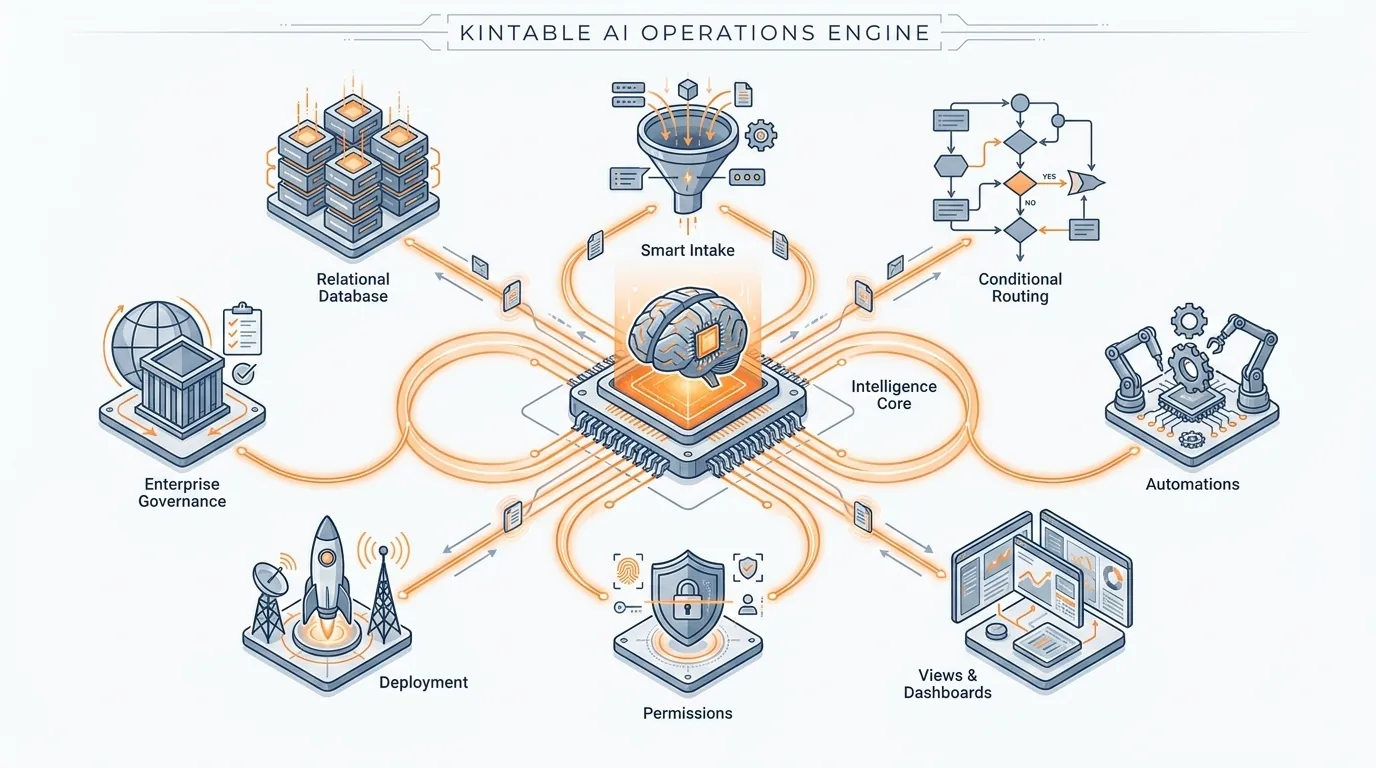
Auto-linked tables, strict field types, validation, and relational integrity structured around the operation.
Conditional approvals, notifications, ownership rules, and SLA escalations run directly against live records.
A secure, branded interface for clients, vendors, or partners that isolates sensitive internal records and controls.
Describe the data, roles, views, and workflow you need. Review the generated structure, refine it directly, and validate permissions and actions before rollout.
Write one sentence about the process you run today — the records, who approves what, and what "done" looks like.
Kintable generates the linked tables, intake forms, statuses, and approval routes. Review the whole system first.
Rename fields, tighten permissions, adjust notifications. Change anything by prompting again or editing directly.
Publish with role-scoped access, audit logging, and SSO already in place. Your team gets a link, not a manual.
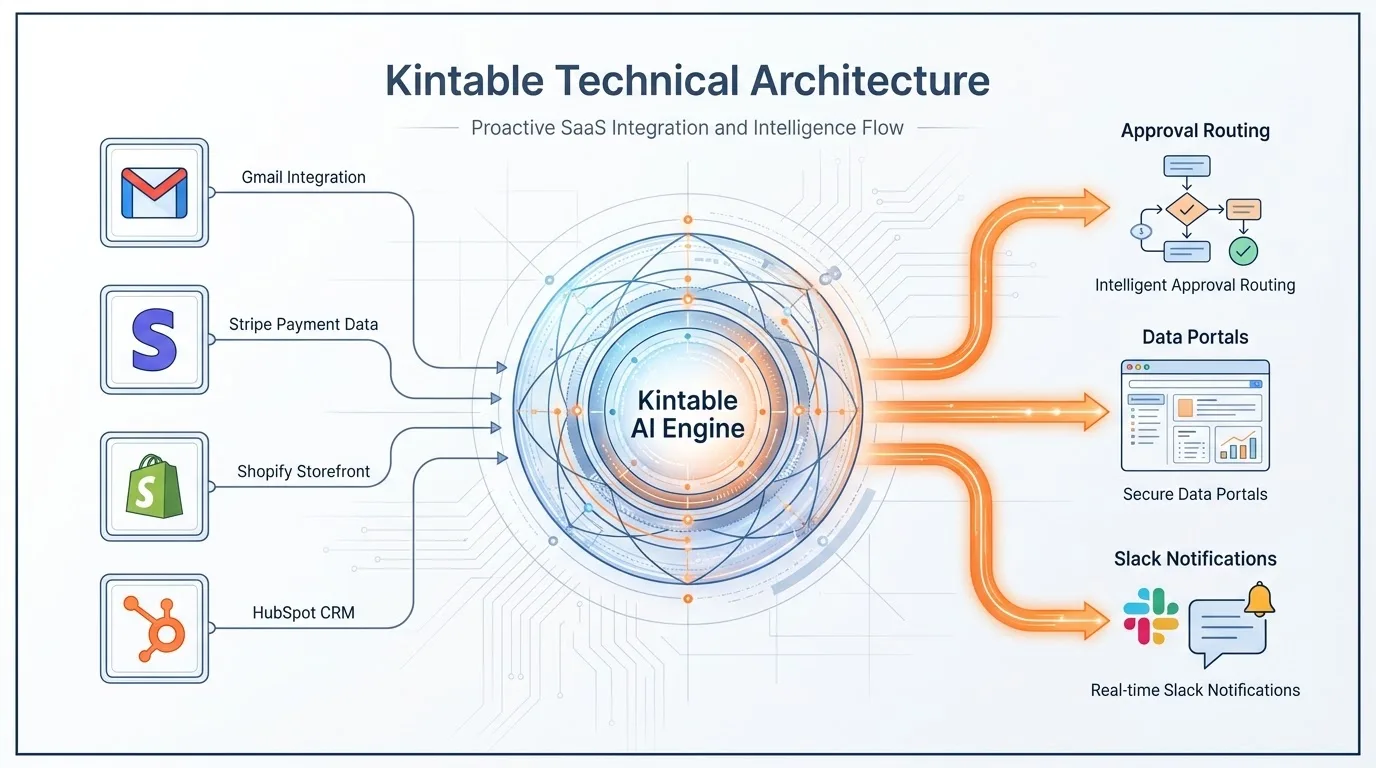
Kintable connects the systems your team already uses, then runs approvals, updates, and audit history from one governed relational database.
Send approval requests, reminders, and status notifications from governed workflow events.
Use payment and finance events to trigger reviews, update records, and preserve decision history.
Keep customer and account updates connected to onboarding, approvals, and operational ownership.
Run critical workflows with centralized identity, granular access, defensible change history, and governed connections to enterprise data.
Centralize authentication, user provisioning, deprovisioning, group access, and role management.
Trace record changes, approvals, workflow events, public sharing, and administrative actions.
Read or synchronize governed warehouse data while preserving source provenance and freshness.
Enforce row-level and field-level policies so every participant sees only authorized information.
Evaluate the architecture behind the workflow—not only the grid your team sees first.
| Evaluation point | Kintable | Assembled no-code stack | Legacy spreadsheets |
|---|---|---|---|
| Starting point | Workflow generation from a plain-English process description | Components configured and connected by a builder | Blank rows, columns, and formulas |
| Conditional workflows | Native approvals, notifications, ownership rules, and SLA escalations | Logic configured across application and automation layers | Manual follow-up, scripts, macros, and email |
| External portals | Generated as a governed layer of the operation | Separate portal configuration, access model, or add-on | Shared files, forms, and duplicated workbooks |
| Governance | Central identity, granular permissions, and unified audit history | Controls distributed across connected components and plans | Primarily file-, workspace-, and sharing-level controls |
Kintable helps teams move from manually assembled workflows to a governed system with connected data, forms, routing, portals, and audit history.
Start with the records, relationships, owners, statuses, and permissions the operation needs.
Generate approvals, reminders, notifications, and escalation paths from the same workflow description.
Give internal teams, clients, vendors, or partners the right forms and views without exposing private records.
Use identity, permission, and audit controls that make the workflow easier to review as it grows.
Ready to map the operating model? Request a tailored Kintable demo.
Bring a workspace or CSV export and the workflow your team is trying to preserve. We’ll assess the current structure and create a migration plan covering tables, relationships, approvals, permissions, and portal requirements.
Start with an export and the current operating process.
Define relationships, routing, ownership, and access requirements.
Review data, rules, permissions, and external views with the team.
Risk reversal: your team reviews the reconstructed data model, routing, permissions, and external views before production launch.
Traditional tools often require teams to configure data, forms, routing, permissions, and portals as separate layers. Kintable starts with the operation you describe and generates the connected relational database, approval routing, forms, permissions, and external portal together.
Kintable generates the relational data model, linked tables, intake forms, role-based views, conditional approval routes, notifications, audit history, and external portal required to run the workflow. Every generated interface uses the same governed records and permission model.
Yes. Start with a workspace or CSV export and the workflow your team needs to preserve. The Kintable team assesses the existing structure and creates a migration plan covering tables, relationships, data types, approval rules, permissions, and portal requirements. Complex workspaces require review before migration begins.
Kintable centralizes identity, access, audit, integration, and data controls for IT review before production rollout. Confirm feature availability and configuration requirements in the security overview.
No. Operations teams describe the workflow in plain English and review the generated database, routing, permissions, and portal before launch. Technical users can extend the system through JavaScript automation steps, REST APIs, and webhooks when specialized logic is required.
Describe the operation in one sentence. Kintable generates the relational database, approval routing, external portal, and governance structure for your team to review.
One workflow · Clear success criteria · Governed evaluation
Generated system includes
Evaluating for your enterprise?